feat: Initial clean release of CHM
一些检查失败了
automerge / automerge (push) Has been cancelled
react-native-android-build-apk / AssembleRelease (push) Has been cancelled
Build macOS M1 / Main (push) Has been cancelled
Joplin Continuous Integration / Main (macos-15-intel) (push) Has been cancelled
Joplin Continuous Integration / Main (ubuntu-22.04) (push) Has been cancelled
Joplin Continuous Integration / Main (ubuntu-22.04-arm) (push) Has been cancelled
Joplin Continuous Integration / Main (windows-11-vs2026-arm) (push) Has been cancelled
Joplin Continuous Integration / Main (windows-2025) (push) Has been cancelled
Joplin Continuous Integration / ServerDockerImage (ubuntu-22.04) (push) Has been cancelled
Joplin Continuous Integration / ServerDockerImage (ubuntu-22.04-arm) (push) Has been cancelled
Joplin UI tests / Main (ubuntu-22.04) (push) Has been cancelled
Joplin UI tests / Main (windows-2025) (push) Has been cancelled
Joplin UI tests / Mobile (push) Has been cancelled
Close stale issues / ProcessStaleIssues (push) Has been cancelled
这个提交包含在:
 chen
16
readme/news/20190613-192613.md
普通文件
16
readme/news/20190613-192613.md
普通文件
@@ -0,0 +1,16 @@
|
||||
---
|
||||
created: 2019-06-13T19:26:13.000+00:00
|
||||
source_url: https://www.patreon.com/posts/customising-your-27609047
|
||||
---
|
||||
|
||||
# Customising your notes with the help of the development tools and CSS
|
||||
|
||||
In Joplin desktop, it has been possible [to customise the appearance of your notes](https://joplinapp.org/help/apps/custom_css) using CSS for quite some time.
|
||||
|
||||
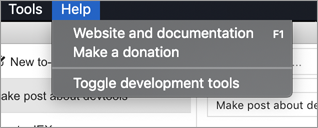
An issue however is that it is difficult to know what CSS to write and how to select specific elements with CSS. The development tools that were just added allow figuring this out. They are available under the menu **Help > Toggle development tools.**
|
||||
|
||||
|
||||
|
||||
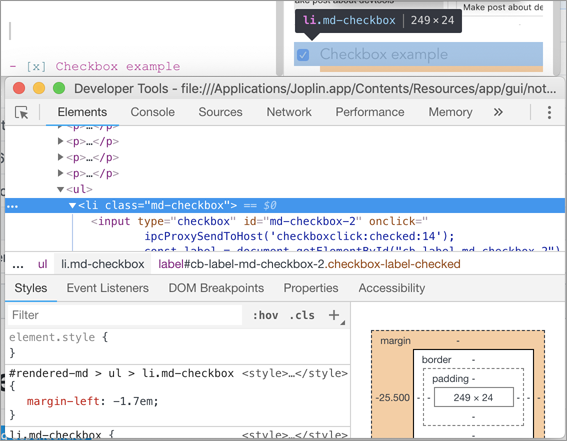
Then, from the "Elements" tab, it is possible to select an element and view the corresponding HTML as well as styles. It is also possible to modify the style in real time and view the changes before adding them to userstyle.css.
|
||||
|
||||
|
||||
在新工单中引用
屏蔽一个用户