feat: Initial clean release of CHM
一些检查失败了
automerge / automerge (push) Has been cancelled
react-native-android-build-apk / AssembleRelease (push) Has been cancelled
Build macOS M1 / Main (push) Has been cancelled
Joplin Continuous Integration / Main (macos-15-intel) (push) Has been cancelled
Joplin Continuous Integration / Main (ubuntu-22.04) (push) Has been cancelled
Joplin Continuous Integration / Main (ubuntu-22.04-arm) (push) Has been cancelled
Joplin Continuous Integration / Main (windows-11-vs2026-arm) (push) Has been cancelled
Joplin Continuous Integration / Main (windows-2025) (push) Has been cancelled
Joplin Continuous Integration / ServerDockerImage (ubuntu-22.04) (push) Has been cancelled
Joplin Continuous Integration / ServerDockerImage (ubuntu-22.04-arm) (push) Has been cancelled
Joplin UI tests / Main (ubuntu-22.04) (push) Has been cancelled
Joplin UI tests / Main (windows-2025) (push) Has been cancelled
Joplin UI tests / Mobile (push) Has been cancelled
Close stale issues / ProcessStaleIssues (push) Has been cancelled
这个提交包含在:
 chen
24
readme/news/20201212-172039.md
普通文件
24
readme/news/20201212-172039.md
普通文件
@@ -0,0 +1,24 @@
|
||||
---
|
||||
created: 2020-12-12T17:20:39.000+00:00
|
||||
source_url: https://www.patreon.com/posts/changing-layout-44961536
|
||||
---
|
||||
|
||||
# Changing the application layout in v1.4
|
||||
|
||||
One feature that may have gone a bit unnoticed in recent versions is the ability to change the application layout. It is mainly aimed at plugins, so that they can create a panel anywhere, and you can then move it wherever you want, but it can also be used to re-arranged existing application components.
|
||||
|
||||
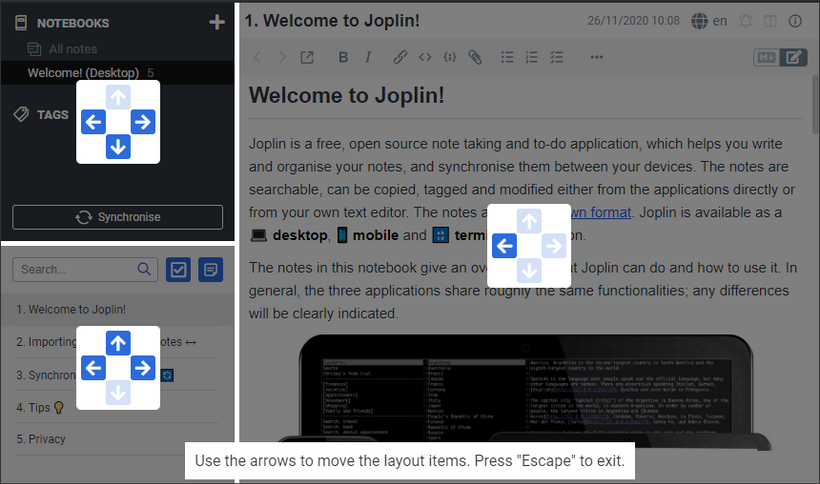
For example, you can put the note list below the sidebar, to have more space for the text editor, move the sidebar to the right of the application, etc.
|
||||
|
||||
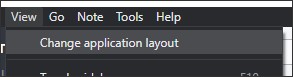
To begin changing the application layout, click on "Change application layout" from the View menu:
|
||||
|
||||
|
||||
|
||||
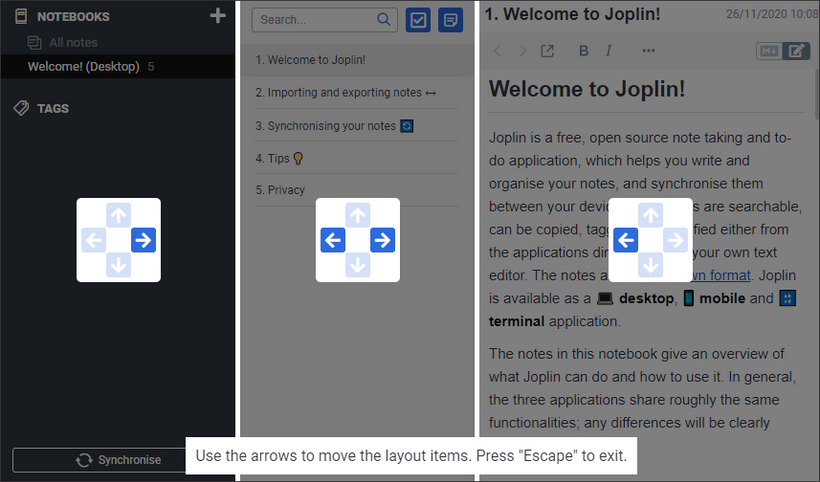
This will put the app into a special mode, from which you can move the side bar, note list and text editor around. You do so by pressing on the arrow keys:
|
||||
|
||||
|
||||
|
||||
For example, pressing the left arrow on the note list would move it to the left, just below the sidebar:
|
||||
|
||||
|
||||
|
||||
Once you're done modifying the layout, press the "Escape" key to exit.
|
||||
在新工单中引用
屏蔽一个用户