 301194963b
一些检查失败了
automerge / automerge (push) Has been cancelled
react-native-android-build-apk / AssembleRelease (push) Has been cancelled
Build macOS M1 / Main (push) Has been cancelled
Joplin Continuous Integration / Main (macos-15-intel) (push) Has been cancelled
Joplin Continuous Integration / Main (ubuntu-22.04) (push) Has been cancelled
Joplin Continuous Integration / Main (ubuntu-22.04-arm) (push) Has been cancelled
Joplin Continuous Integration / Main (windows-11-vs2026-arm) (push) Has been cancelled
Joplin Continuous Integration / Main (windows-2025) (push) Has been cancelled
Joplin Continuous Integration / ServerDockerImage (ubuntu-22.04) (push) Has been cancelled
Joplin Continuous Integration / ServerDockerImage (ubuntu-22.04-arm) (push) Has been cancelled
Joplin UI tests / Main (ubuntu-22.04) (push) Has been cancelled
Joplin UI tests / Main (windows-2025) (push) Has been cancelled
Joplin UI tests / Mobile (push) Has been cancelled
Close stale issues / ProcessStaleIssues (push) Has been cancelled
24 行
1.4 KiB
Markdown
24 行
1.4 KiB
Markdown
---
|
|
created: 2020-12-12T17:20:39.000+00:00
|
|
source_url: https://www.patreon.com/posts/changing-layout-44961536
|
|
---
|
|
|
|
# Changing the application layout in v1.4
|
|
|
|
One feature that may have gone a bit unnoticed in recent versions is the ability to change the application layout. It is mainly aimed at plugins, so that they can create a panel anywhere, and you can then move it wherever you want, but it can also be used to re-arranged existing application components.
|
|
|
|
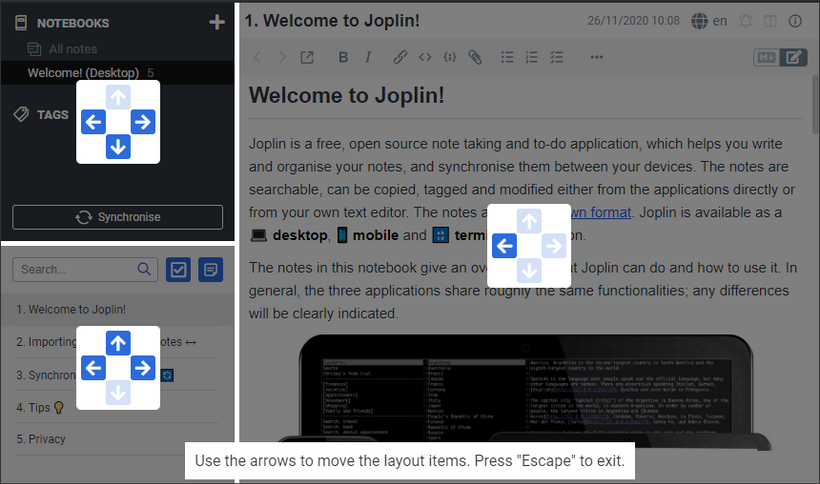
For example, you can put the note list below the sidebar, to have more space for the text editor, move the sidebar to the right of the application, etc.
|
|
|
|
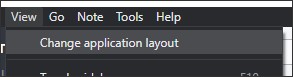
To begin changing the application layout, click on "Change application layout" from the View menu:
|
|
|
|
|
|
|
|
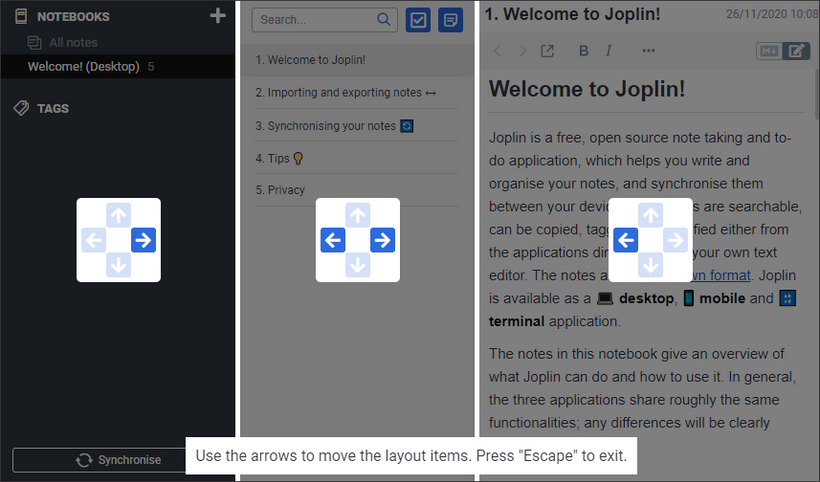
This will put the app into a special mode, from which you can move the side bar, note list and text editor around. You do so by pressing on the arrow keys:
|
|
|
|
|
|
|
|
For example, pressing the left arrow on the note list would move it to the left, just below the sidebar:
|
|
|
|
|
|
|
|
Once you're done modifying the layout, press the "Escape" key to exit. |